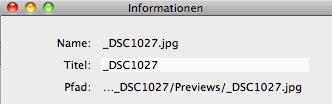
Tested the new version 2.3.4. Following observations were made:
- opened an image in my Aperture lib via the HoudahGeo media browser
- no access to the originals
- only the previews are available
- therefore no geocoding possible, since the refresh of the meta data from the original cannot find geo metadata (previews are tagged)
See the attached screenshot from the information/inspector panel.
Update:
Double checked that issue with v. 2.3.3. No change, I am unable to access my originals (.NEFs) via the HoudahGeo media browser. Only the jpg.-previews are available
Hi!
I believe what you describe is actually expected behavior. HoudahGeo will always work with the JPG versions during geocoding. These will also be used during publishing to Google Earth, Flickr or Locr.
When writing EXIF however, you will get the option to "Tag Masters/Originals". With that checked and Aperture library preloading enabled, HoudahGeo will go find the master file (.NEF) and tag that.
You may verify that HoudahGeo is able to find the master files by going to the Inspector window and clicking Reveal Master in Finder. This should point you to the .NEF file.
Best,
Pierre Bernard
Houdah Software s.à r.l.
Hi Pierre,
please correct me, but that is exactly the behavior one should not expect:
(the preload of the Aperture lib is checked, by the way)
- to work with the jpeg-previews makes no sense, whenever I make an adjustment to the RAWs, a new preview is initiated, the geodata is lost
- I always tag the originals (in this case the jpeg-previews)
- to reveal the originals via the inspector panel (in finder) is not an option for a bunch of images
Lets make a long story short, if HoudahGeo does not allow to tag my RAW-images via the image browser, I have to look for different tool (maybe Maperture Pro is a better solution), despite the fact that Apple still not care about the annoying Aperture bug, that exported versions do not hold the geodata.
Tom
Hi Tom!
You misunderstood me. HoudahGeo works with the preview images so it always has the latest adjustments when publishing to Google Earth, …
When writing EXIF you will obviously most often have HoudahGeo "Tag Masters/Originals". These are your RAW NEF file.
HoudahGeo does indeed serve the exact purpose you intend to use it for. Getting access to the master images is what the Aperture integration is all about.
Best,
Pierre Bernard
Houdah Software s.à r.l.
Perhaps I was not straight enough:
1. Try to access your RAW-files (aka originals) in the Aperture lib via the HoudahGeo media browser!
2. No way, you will always get access only to the jpg-previews (check my screenshot attached to the first post)!
3. If you geotag this image as a an original, you will geotag the jpg-preview and not the RAW-file! But the RAW-file is per definition the original. It makes no sense to geotag a preview, that may be changed with the next amendment to the RAW-file!
Got that problem now???
I am unable to geotag my RAWs inside the Aperture lib, full stop.
Hi!
1. There is no reason to access the RAWs and manipulate them in HoudahGeo. You would not want to publish un-retouched images.
2. Yes, HoudahGeo will show you the preview image. It however knows how to find the matching RAW master.
3. If you ask HoudahGeo to "Tag masters/originals", it will look up the RAW file matching your JPEG preview and tag that RAW file.
I agree that it makes little sense to geotag the preview images. All you need to do is to check the "Tag masters/originals" checkbox and this will not happen. HoudahGeo WILL tag the original master RAW files if you ask it to do so.
HoudahGeo serves two very different purposes: publishing and geotagging. Publishing always needs to use the latest preview versions. For geotagging it often makes more sense to tag the master files. That is why you are given the option.
Best,
Pierre Bernard
Houdah Software s.à r.l.
P.S: If you prefer to carry on this conversation in German, please feel free to email me. I will be out of the office tomorrow though.
Negative, the checkbox "Geocode the original" results in tagging the jpg-preview. HoudahGeo does not geotag the RAW-file. I have carried out a bunch of test runs: always the same result, the originals are untouched ( I am so tired!).
Hi!
Please check /Applications/Utilities/Console.app for error messages as you add the image to the project and as you try to tag master files.
Please verify in the Inspector window that HoudahGeo is able to reveal the master file in the Finder.
After tagging a master file, create a new project in HoudahGeo. Add the same image. Does it show the tags. If it does, it was tagged successfully.
To see tags in Aperture, you need to "Reload metadata from EXIF".
Where are your master files located: within your Aperture library or at their original location? Where is that location: main hard drive, external hard drive, mount point, ….
Best,
Pierre Bernard
Houdah Software s.à r.l.
Guten Abend!
Ich hoffe das Problem hat sich inzwischen geklärt.
Im Grunde ist die Sache ganz einfach. HoudahGeo zeigt, genau wie Aperture, immer das neuste Preview an. Dieses wird auch benützt wenn das Foto veröffentlicht werden soll.
Beim Schreiben von EXIF Daten, besteht dann aber die Möglichkeit auf die entsprechende RAW Master Datei zuzugreifen. Dazu muss einfach "Originale bearbeiten" angekreuzt werden. Natürlich darf "Kopien erstellen" nicht angekreuzt sein. Auch darf keine XMP Begleitdatei anwesend oder erzeugt werden. Aperture unterstützt diese nicht.
Dank "Aperture-Mediatek laden" kann HoudahGeo von der Vorschau zur Master Datei finden. Dass dies wirklich funktioniert kann im "Informationen" Fenster per "Originaldatei im Finder anzeigen" überprüft werden.
Beste Grüsse,
Pierre Bernard
Houdah Software s.à r.l.
Hallo,
hmmm, irgendwie gibt es dann wohl "schon" zwei Personen die etwas nicht richtig machen oder irgendetwas übersehen, denn ich habe das gleiche Probleme mit HoudahGeo 2.3.4 und Aperture 2.1.4 unter Snow Leopard 10.6.1.
Was mir aufgefallen ist, ist das HoudahGeo eine unterschiedliche Anzahl von Bildern anzeigt, je nachdem was unter Einstellungen : Mediatheken ausgewählt ist. Wenn ich "nur" iPhoto und Aperture auswähle, dann werden weniger Bilder angezeigt als wenn Mediatheken ausgewählt ist, was wohl alle (?) lädt. Auf dem Rechner gibt es aber nur iPhoto and Aperture aber keine Lightroom Datenbank. Interessanterweise tauchte in dieser Option nur ein (gesuchtes) Bild auf statt zwei, aber auch das wurde dann nicht mit den Geodaten versehen.
Meine Bilder werden auf der lokalen, internen Festplatte von Aperture verwaltet (Nikon NEF).
Vorschläge was ich ausprobieren kann, um das Problem sinnvoll einzukreisen?
Gute Nacht!
tk
Hello Pierre;
I am using Aperture 2.1.4 on Snow Leopard now, and HoudahGeo 2.3.4 (2545).
I too am noticing that the RAW files are not tagged by HoudahGeo. I have ensured that the correct boxes are checked to have HoudahGeo tag the masters and also have told Aperture to update from the EXIF. I have also tried restarting both programs to try to get it to work. Still, I've had no success. Have you made any progress on this issue?
Regards;
Gary
By the way... My German is a bit rusty. If I missed something you said that fixes the problem, could you clarify?
Hallo tk!
Welcher Mediathek werden die zusätzlichen Bilder zugeordnet? Vielleicht entstammen diese ja einer ehemalig installierten Lightroom Demoversion.
Du kannst überprüfen ob HoudahGeo wirklich die Master Datei getaggt hat indem du ein neues HoudahGeo Projekt anlegst und das Bild diesem Projekt hinzufügst. Zeigt HoudahGeo die Koordinaten, wurden diese auch tatsächlich geschrieben und konnten wieder ausgelesen werden.
Ob HoudahGeo wirklich von der Vorschau zum Master finden kann, kann im "Informationen" Fenster per "Originaldatei im Finder anzeigen" überprüft werden. Bei der Gelegenheit solltest du auch überprüfen ob sich in dem Ordner eine XMP Begleitdatei befindet. HoudahGeo würde diese in dem Fall benutzen. Aperture hingegen nicht.
Beste Grüsse,
Pierre Bernard
Houdah Software s.à r.l.
Hi Gary,
Please use the "Reveal Master/Original in Finder" option in the Inspector window to confirm that HoudahGeo is able to find its way from the preview image to the master file.
Verify that there is no XMP sidecar at the location of the master file. HoudahGeo would make use of that. Aperture however does not support XMP sidecars.
Please add the tagged image to a fresh HoudahGeo project. If the coordinates are shown, they were indeed written and could also be read.
Best,
Pierre Bernard
Houdah Software s.à r.l.
Hello Pierre;
I tried what you suggested.
I created a new project and tagged the images.
Then I tried to export only the coords and elevation back to the master.
But...the program reported that it couldn't find the images.
I went into Aperture and did an export masters.
Then I navigated to the images in question and used EXIFTOOL to check the metadata.
This indicated that the master JPG was present, but contained no coord data.
I then checked the JPG in the Previews directory and found it did contain the coordinates.
Regards;
I should have also added that the finder couldn't locate the master and there was no XMP.
Regards;
Hi Gary!
What was the exact error message?
Please check /Applications/Utilities/Console.app for additional error information?
Where does "Reveal Original/Master in Finder" point you?
Best,
Pierre Bernard
Houdah Software s.à r.l.
Hi!
If the master cannot be found from the Inspector window, it will not be found during EXIF export either. Now the question is why the master could not be found.
Console output may give some clues here.
I would also like to know where your image files are located: main drive, external drive, within the Aperture library or outside, at a mount point, …
Best,
Pierre Bernard
Houdah Software s.à r.l.
Hi Pierre;
I tried to recreate the error and could not.
When it originally happened, there was no log entry and the message appeared to have come from HoudahGeo in a modal dialog box. It simply said that the files I was trying to tag were "missing". I also remember that I had used a saved project from prior to the update to 2.3.4.
This time I started over from first principles and it just failed to write the data to the master JPG. HoudahGeo did not appear to misbehave, so I assume it managed to write the data somewhere. I'm including a screenshot of the relevant windows and an exiftool dump of the Master jpeg and Preview jpeg data after the attempt to export the coords and elevation. Don't know if that will help.
Just a thought. I seem to remember that HoudahGeo did not like to allow one to re-tag a shot once it had a set of coordinates in the exif. If the coordinates are erroneously being written to the preview jpeg, as they seem to be, HoudahGeo may not let one correct the error. It thinks it's done it's job already.
The snapshot shows that I have them my Aperture Library on the main drive in my pictures directory.
I think I'll try to regenerate the previews and see what HoudahGeo does to the Master and Preview.
Let me know, if you'd like me to try something else.
Regards;
Moin moin Pierre,
Welcher Mediathek werden die zusätzlichen Bilder zugeordnet? Vielleicht entstammen diese ja einer ehemalig installierten Lightroom Demoversion.
Gute Frage... Habe mir das heute noch einmal in aller Ruhe angeschaut, here we go:
1. In HoudahGeo habe ich in den Voreinstellungen nur noch "Aperture" als Mediathek ausgewählt, alle anderen Optionen in diesem Fenster sind nicht ausgewählt. Entsprechend der Anweisung dort habe ich HoudahGeo beendet und wieder neu gestartet.
2. Aperture ist während der ganzen Zeit nicht geöffnet.
3. Kann man nicht ensinnen jemals eine Demo Version von Lightroom installiert zu haben.
4. Wenn ich nun in HoudahGeo eine Projekt in Aperture auswähle gibt es eine Abweichung im Hinblick auf die Anzahl der Bilder. HoudahGeo meldet das folgende für das Projekt: 2390 Fotos und für das Album innerhalb des Projektes: 1195 Fotos. Aperture selber meldet aber: Projekt: 2066 Fotos - 1807 Fotos angezeigt bzw. für das Album: 2066 Fotos - 1195 Fotos angezeigt. Es ist keine Filteroption in Aperture ausgewählt sondern die Option "Alle einblenden".
5. Die weiteren Einstellungen für HoudahGeo sind: Nur geokodierte Bilder & Original bearbeiten. Als zu schreibenden Datenfelder habe ich die folgenden ausgewählt: Koordinaten, Höhe, Stadt, Bundesstaat und Land.
Du kannst überprüfen ob HoudahGeo wirklich die Master Datei getaggt hat indem du ein neues HoudahGeo Projekt anlegst und das Bild diesem Projekt hinzufügst. Zeigt HoudahGeo die Koordinaten, wurden diese auch tatsächlich geschrieben und konnten wieder ausgelesen werden.
Meinst Du innerhalb von HoudahGeo selber? Falls ja dann habe ich wie folgt weitergemacht:
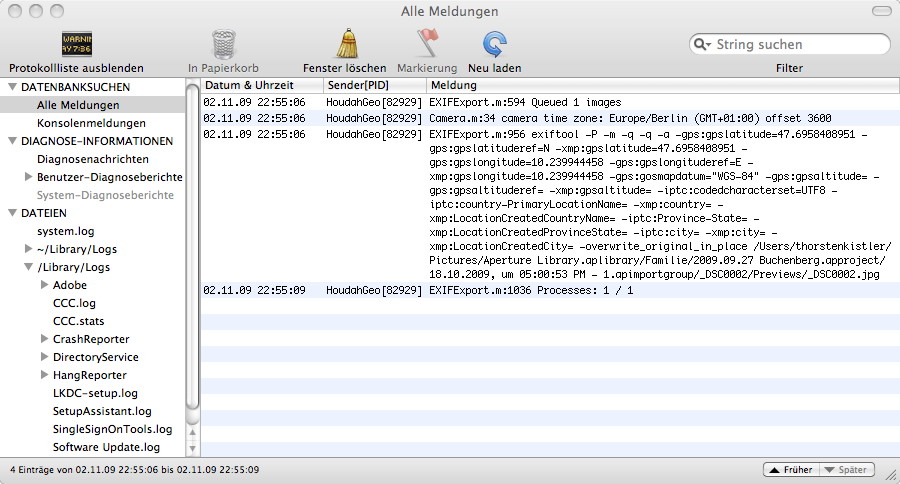
6. Exportieren und laut HoudahGeo wird etwas geschrieben. Habe einmal die Konsolenmeldung diesbezüglich angehängt.
7. Wenn ich nun innerhalb von HoudahGeo "Im Finder anzeigen" dann bringt mich der Finder zu Previews _DSC0001.jpg, also nicht zu dem .NEF.
8. In diesem Zusammenhang fällt mir noch das folgende auf, vielleicht hilft das ja irgendwie weiter: In dem Aperture Projekt sind die Bilder anders benannt, weil die Originaldateien beim Import umbenannt wurden. Dort heißt die Arbeitskopie "20090927.01 Buchenberg" bzw. der Dateiname "20090927.01 Buchenberg.NEF". Im Medien Fenster von HoudahGeo werden diese Namen auch angezeigt aber im Projektfenster steht "nur" _DSC0001.jpg.
Ob HoudahGeo wirklich von der Vorschau zum Master finden kann, kann im "Informationen" Fenster per "Originaldatei im Finder anzeigen" überprüft werden. Bei der Gelegenheit solltest du auch überprüfen ob sich in dem Ordner eine XMP Begleitdatei befindet. HoudahGeo würde diese in dem Fall benutzen. Aperture hingegen nicht.
Habe für den Test heute ein Bild verwendet, welches ich noch nie vorher mit HoudahGeo oder einer anderen Software angefasst habe. Es wurde nur in Aperture importiert.
Hilft das irgendwie weiter die Sache einzukreisen?
Schönen Abend,
tk
Hi Gary!
The message about missing images means that the image HoudahGeo is working with has disappeared since it got added to the project.
There is no mechanism in HoudahGeo which would forbid writing to previously tagged images.
Does the screenshot show the location revealed by "Reveal Master in Finder"? This seems to be the correct location for the master file.
Could you please send me the Console output from HoudahGeo?
Best,
Pierre Bernard
Houdah Software s.à r.l.
Hallo tk!
Meinst du "Originaldatei im Finder anzeigen"?
Wird die gleiche Datei angezeigt wie bei den beiden andern Optionen?
Beste Grüsse,
Pierre Bernard
Houdah Software s.à r.l.
Hallo tk!
4. Ist ein harmloses Bug. Wenn ein Aperture Projet Ordner enthält, werden Bilder die im Ordner abgelegt sind doppelt gezählt: ein Mal als Teil vom Projekt und ein zweites Mal als Teil vom Ordner.
Danke für den Fehlerbericht.
Beste Grüsse,
Pierre Bernard
Houdah Software s.à r.l.
Hello Pierre;
I just noted your response.
I will look into gathering the requested information later today.
Regards;
Hi Pierre;
I am sending you the relevant section of the console log. It clearly shows that HoudahGeo is trying to use the EXIFTOOL to execute an "overwrite_original_in_place" to put the location data into the JPG in the Preview directory.
Here is an extract from that log of the command HoudahGeo sent to EXIFTOOL:
09-11-04 8:32:13 PM HoudahGeo[414] EXIFExport.m:956 exiftool -P -m -q -q -a -gps:gpslatitude=13.0022513658 -gps:gpslatituderef=N -xmp:gpslatitude=13.0022513658 -gps:gpslongitude=77.624213484 -gps:gpslongituderef=E -xmp:gpslongitude=77.624213484 -gps:gosmapdatum="WGS-84" -gps:gpsaltitude=920.65000 -gps:gpsaltituderef=above -xmp:gpsaltitude=920.65000 -overwrite_original_in_place /Users/username/Pictures/Aperture Library.aplibrary/Project Code 001: GARY D. GAUTHIER/2009 (Stripped)/2009-04-07 (Neighbourhood of Auntie Eapen, Bengaluru, KA, IN).approject/2009-09-18 @ 09:05:54 AM - 1.apimportgroup/DSC00673/Previews/DSC00673.jpg
0
What is also confusing is that the Path field in the Inspector Pane points to the JPG in the Preview Directory, but selecting Reveal Master correctly finds the Master JPG one level up from the Preview Directory.
Hope this helps.
Regards;
Hi Gary!
I am awfully sorry: when making changes to the iPhoto integration for HoudahGeo 2.3.4, I did indeed break Aperture integration. Thinking that I had not touched any of the Aperture code, I did not re-test it prior to releasing 2.3.4.
Thank you for reporting this issue.
I'll see to fix this as soon as possible.
Best,
Pierre Bernard
Houdah Software s.à r.l.
Hi Pierre;
Thank you.
Aperture integration appears to work correctly in v2.3.5.
That means I'll be busy completing the tagging of my key photos.
However; I did notice that the iPhoto Library no longer appears in the Media Window. It is checked in the Preferences Menu, so it should be there. It was in the last version (v2.3.4). Could this be a glitch? It's not really important to me, but some may have problems with it.
Regards;
Hi!
Glad to hear it is working for you now.
The iPhoto library shows up just fine here.
Best,
Pierre Bernard
Houdah Software s.à r.l.
Hi Pierre,
I initiated this topic and for a long time it looked like an isolated problem on my side. Great, that you found the bug. On my side the tagging of my RAWs is working again, nice job. But now it seems to me that the reverse geocode feature is broken. I tested an image from my Aperture lib with different, even popular locations, but HoudahGeo reports, that reverse geocoding fails. Ups???
Hi!
Thank you for reporting this issue.
Reverse geocoding using Google Maps is indeed broken. It appears that the Google Maps API has changed.
Best,
Pierre Bernard
Houdah Software s.à r.l.
Moin moin,
sorry, war geschäftlich unterwegs, von daher komme ich erst jetzt wieder dazu mich zu melden. Die Version 2.3.5 löst auch bei mir das Problem. HoudahGeo schreibt jetzt also die entsprechenden Daten in die Datei und das ganze wird korrekt in Aperture angezeigt bzw. übernommen.
Vielen Dank,
tk